PNG+hen
A picture with HEN metadata. Share a goban snapshot, restore the position without OCR.
«Imagine if we could share kifu, tsumego, joseki images (PNG+hen) and study them directly in our favorite app.»
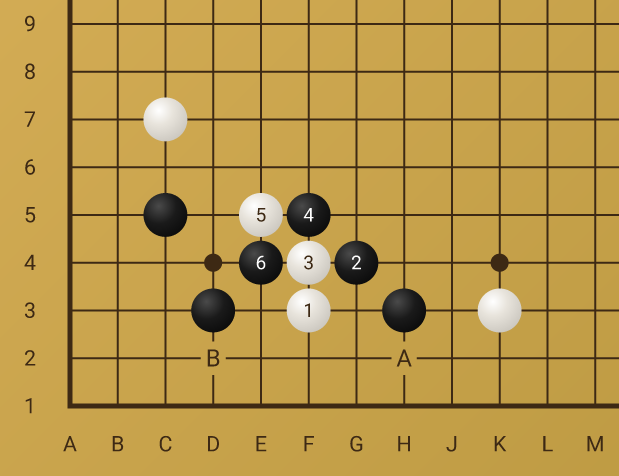
The image above is a live PNG+hen generated by a hen-worker.
It contains the exact board position as embedded metadata.
Extract it using exiftool -HEN image.png,
or load the image directly into play.GoShawk.cc/playgo/goban.html.
What is PNG+hen?
Goban as Data
A PNG image of the board with the HEN
string embedded as a PNG tEXt metadata chunk. Machine-readable and
human-visible at the same time.
Universal Interchange
Any app that supports HEN can import the position directly from the image file. Drag, drop, paste - the goban is restored instantly.
No OCR Needed
Unlike plain board screenshots, the
position is stored losslessly. Extract it with exiftool, Pillow, or any
standard PNG reader - no image recognition required.
Use Cases
Use cases 1–3 happen on App A (export). Use cases 4–5 happen on App B (import).
App A - Export
Copy HEN
Open a finished game, navigate to an interesting position.
Copy Image URL
Navigate to a position, copy the image URL.
wrk.goshawk.cc/.../hen<HEN>.png
Download PNG
Navigate to a position, download the goban picture.
App B - Import
Paste HEN
Open an analysis goban and paste the HEN string.
Reverse of UC 1.
Paste Image
Open an analysis goban and paste the PNG+hen picture.
Reverse of UC 3. The app
reads the HEN from the PNG tEXt chunk.
Ecosystem
HEN Spec
The specification and formal grammar (EBNF) for Hemme Notation.
hen-js
Dependency-free library for converting between HEN and SGF formats.
hen-python
Python library for parsing and serializing HEN notation.
hen-worker
Dynamic goban image generator with embedded HEN metadata. Edge-native.
GoShawk Extension
Capture Go diagrams from any webpage and export as SGF or HEN.